How to clone your own voice and keep it yours
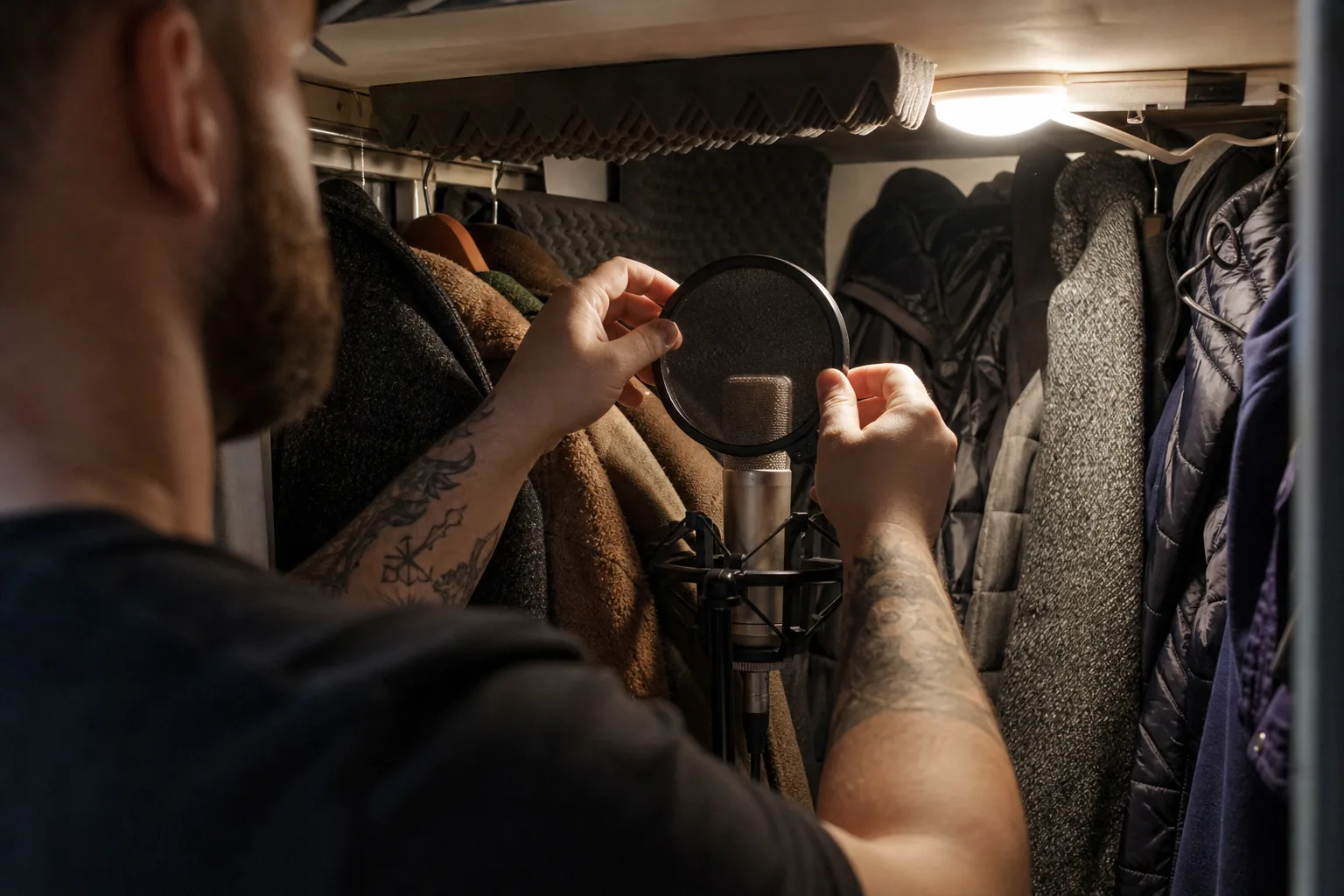
Learning how to clone your own voice comes down to three things: a clean recording, a verified consent step, and clear rules about who can use the result. This guide walks through each one, from the room you record in to the moment you delete the clone, so the voice that reads your scripts sounds like you on a good day and stays under your control.
Why people clone their own voice in the first place
Most people who decide to clone my voice, as they usually put it, are not chasing a novelty. They have a job that keeps asking for the same voice again and again: course lessons that need a corrected sentence, onboarding modules that change every quarter, a podcast intro that has to mention this week's guest, product walkthroughs that go stale after each release. Re-recording a two minute narration because one number changed is the kind of work that quietly eats an afternoon.
A voice clone turns that into typing. You record once, the clone learns how you sound, and from then on you write the script and export the audio. The corrected sentence takes a minute, not a studio booking. For anyone who teaches, sells or explains for a living, that changes how often they are willing to update their material.
There is a second reason that matters just as much: consistency. A team that uses a stock voice for half its videos and the real trainer for the other half sends a mixed signal. When the voice is the actual person, the audience hears someone they already know.
What the clone learns from your sample
A voice clone learns your timbre, your pitch range, your pace and the small habits that make you recognizable, such as how you land the end of a sentence. It also learns everything else that is in the recording. If your sample has a humming fridge, a slight echo from bare walls or a laptop fan, the clone hears those as part of your voice. That is why the recording matters more than any setting you change later.
In IdClone the voice sample is 60 seconds long. That is enough when the minute is clean, and no amount of extra minutes rescues a noisy one. Treat that single minute like a short studio session.
Pick a quiet room with soft surfaces
The best home recording room is usually not the office. It is the room with the most soft stuff in it: a bedroom with curtains, a carpet and a bed, or a walk-in closet full of clothes. Soft surfaces absorb reflections, and reflections are what make a voice sound distant and hollow.
- Turn off fans, air conditioning and anything with a compressor for the minute you record.
- Close the window and the door, and put your phone in silent mode.
- Clap once and listen. A sharp ring means the room is too live, so hang a blanket behind the laptop or move closer to the soft side of the room.
- Record at a quiet time of day, when traffic, deliveries and neighbors are at their lowest.
Use the best microphone you already have
You do not need a professional studio microphone to clone your own voice well. A recent phone held at the right distance often beats an expensive microphone placed badly. What matters is a steady distance and enough signal without clipping.
- A USB microphone or a wired headset microphone gives the most consistent result. Keep it about a hand's width from your mouth, slightly off to the side so your breath does not hit it directly.
- A phone works well too. Hold it or prop it at chest height, about 8 to 12 inches away, pointing at your mouth, and use the voice memo app at its highest quality setting.
- Avoid the built-in laptop microphone when you can. It sits next to the fan and the keyboard and picks up the room more than your voice.
- Do a ten second test and play it back on headphones. If you hear the room, move closer to the microphone. If you hear crackle on loud words, move back a little.
Read something that sounds like your real work
The sample should sound like the way you will actually use the clone. If you narrate training, read a paragraph of training. If you record sales follow-ups, read a short, friendly follow-up. A clone built from a stiff, read-aloud text tends to produce stiff output, while a clone built from natural speech sounds natural.
- Use a script of about 150 words, which fills a minute at a relaxed pace.
- Mix statements, a question and a list, so the clone hears your rising and falling intonation.
- Include a few numbers, a product name and a longer word or two, so the clone hears how you handle them.
- Read it out loud twice before recording. The first read finds the words you trip on.
Speak the way you want to sound later
Sit up, drink some water and record after you have been talking for a while, not first thing in the morning. Keep your energy at the level you want in the final audio. If you whisper the sample, you get a whispering clone; if you perform it like a radio ad, every lesson sounds like a radio ad.
Small mistakes are fine. If you stumble, pause, then repeat the sentence calmly. What hurts the sample is long silence, laughter, coughing and side comments to someone in the room, so keep those out of the minute you submit.
Consent is the step that makes it your clone
A voice is personal. Anyone who has heard a short clip of you could, in principle, try to copy it, which is exactly why the way you clone your own voice matters as much as the quality. In IdClone a clone exists only after the person whose voice it is proves it is them and says so on record.
Before any clone is built you pass a live selfie check and read a spoken consent statement that includes a one time phrase shown on screen. That consent recording is matched to your training footage and your voice sample. Someone who only has an old clip of you cannot produce the one time phrase in your voice live, so they cannot start a clone of you. If a teammate needs a clone, they receive their own invite and record their own consent; nobody records consent on behalf of someone else. No identity documents are uploaded or processed at any point. The full process is explained on consent and safety.
How to keep your voice clone yours after it exists
A clone is only as safe as the rules around it. Before you clone your voice with any tool, check four things, and in IdClone each one has a clear answer.
- Who can use it. Your clone lives in your workspace. On team plans you decide who has an editor or reviewer role, and the owner controls the workspace.
- What it is trained for. Your recordings are used only to build and run your own clone, never to train shared models.
- How to remove it. You can delete the clone at any time, and the model files are removed.
- How listeners know. Every export can carry a visible AI-generated label and content credentials metadata, and each clone keeps a consent record and an audit log.
It also helps to set your own house rules. Decide which kinds of content you are comfortable publishing in your cloned voice, keep scripts in a shared folder so you can see what was said, and tell your audience when audio is generated. Our acceptable use rules already block impersonation, public figures and deceptive use, but your own rules make the clone fit your brand.
Tune pronunciation and pacing once
Once the clone exists, the work moves to the script. Product names, acronyms and surnames are where any voice clone is most likely to stumble. On Pro and above, the pronunciation dictionary lets you set how a word should be said once, and every later script uses it. Commas and full stops control pacing more than people expect: a comma adds a short breath, a full stop adds a longer one, and splitting a long sentence into two is the quickest fix for audio that sounds rushed.
Export voice-only audio as WAV for editing or MP3 for publishing. If you want the same script presented on camera, the same recording session builds your video clone too; the voice cloning page shows how the voice and video sides work together.
How many minutes you get each month
Voice clone minutes are counted separately from avatar video minutes. Starter includes 40 voice clone minutes a month, Pro 120, Business 300 and Enterprise 700. A weekly ten minute podcast intro plus a few lesson corrections fits comfortably in Starter, while a course creator narrating a new module every week usually lands on Pro. All plans are billed monthly or yearly, and yearly saves 50 percent; the full table is on pricing.
Questions and answers
How long does the voice sample need to be?
IdClone asks for a 60 second voice sample. A clean minute in a quiet room gives a better clone than several minutes recorded with background noise.
Can I clone my voice with just my phone?
Yes. A recent phone held at chest height, 8 to 12 inches from your mouth, in a room with soft surfaces, records a sample that works well.
Can I clone someone else's voice for them?
Only if that person records their own consent from their own invite. Nobody can create a clone of another person, and public figures, politicians and celebrities are blocked.
What happens to my recordings if I delete the clone?
You can delete your clone at any time and the model files are removed. Your recordings are never used to train shared models.